Bulk Users AD

Create Bulk Users in Active Directory using PowerShell
Bulk User Certation in Active Directory
Steps:
Need to create excel files and save as .csv extension
Rows Fields as per requirement
Suppose I am having these below mention common fields
Using the CSV file

Extension format

Save .csv file in same server

Now here now users in mention OU Active directory

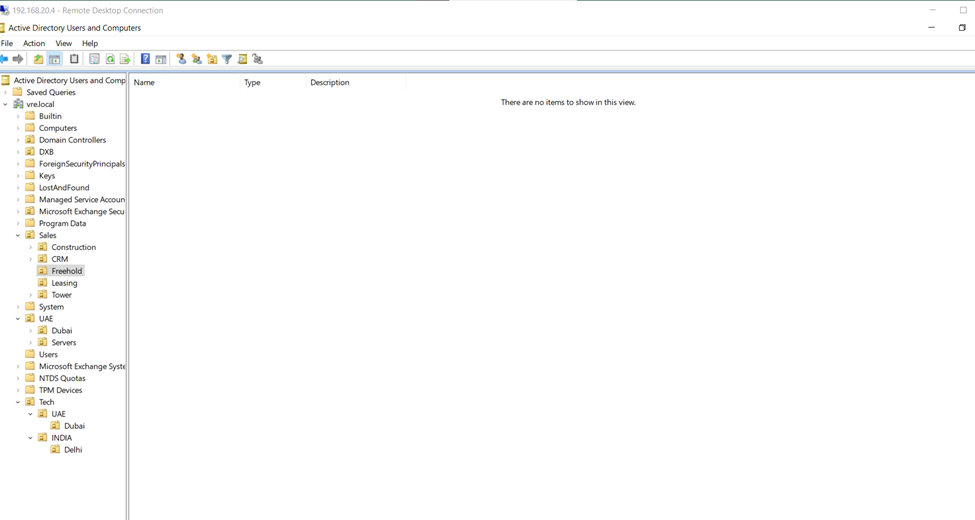
So,
Now write the script to create Active Directory Bulks users
In scripts fields user’s details should be same as you have mention in excel.csv file
Like


Powershell Scripts
# Import Active Directory module for running AD cmdlets
Import-Module activedirectory
#Store the data from your file in the $ADUsers variable
$ADUsers = Import-csv C:\BalksUser\bulks.csv
#Loop through each row containing user details in the CSV file
foreach ($User in $ADUsers)
{
#Read user data from each field in each row and assign the data to a variable as below
$Username = $User.Username
$Password = $User.Password
$Firstname = $User.Firstname
$Lastname = $User.Lastname
$OU = $User.OU
$department = $User.Department
$Email = $User.Email
$State = $User.State
$Country = $User.Country
$Branch = $User.Branch
$JoiningDate = $User.JoiningDate
#Check to see if the user already exists in the AD
if (Get-ADUser -F {SameAccountName -eq $Username})
{
#If the user does exist, give a warning
Write-Warning “A user account with username $Username already exists in Active Directory.”
}
else
{
#User does not exist then proceed to create the new user account
#Account will be created in the OU provided by the $OU variable read from the CSV file
New-ADUser `
-SameAccountName $Username `
-UserPrincipalName “$Username@vre.local” `
-Name “$Firstname $Lastname” `
-GivenName $Firstname `
-Surname $Lastname `
-Enabled $True `
-DisplayName “$Lastname, $Firstname” `
-Path $OU `
-State $State `
-Email $Email `
-Country $Country `
-Branch $Branch `
-JoiningDate $JoiningDate `
-Department $department `
-AccountPassword (convertto-securestring $Password -AsPlainText -Force) -ChangePasswordAtLogon $True
}
}
So,
Open PowerShell ISE as administrator


Write the scripts or paste it
And save it with extension .ps1

Once scripts save kindly run it

created users

So once scripts run successfully you will check the crated users in OU

2nd


# Import Active Directory module for running AD cmdlets
Import-Module activedirectory
#Store the data from your file in the $ADUsers variable
$ADUsers = Import-csv C:\BalksUser\b3.csv
#Loop through each row containing user details in the CSV file
foreach ($User in $ADUsers)
{
#Read user data from each field in each row and assign the data to a variable as below
$Username = $User.Username
$Password = $User.Password
$Firstname = $User.Firstname
$Lastname = $User.Lastname
$OU = $User.OU
$department = $User.Department
$State = $User.State
$City = $User.City
$Country = $User.Country
#Check to see if the user already exists in the AD
if (Get-ADUser -F {SamAccountName -eq $Username})
{
#If the user does exist, give a warning
Write-Warning “A user account with username $Username already exists in Active Directory.”
}
else
{
#User does not exist then proceed to create the new user account
#Account will be created in the OU provided by the $OU variable read from the CSV file
New-ADUser `
-SamAccountName $Username `
-UserPrincipalName “$Username@vre.local” `
-Name “$Firstname $Lastname” `
-GivenName $Firstname `
-Surname $Lastname `
-Enabled $True `
-DisplayName “$Lastname, $Firstname” `
-Path $OU `
-State $State `
-Department $department `
-City $City `
-Country $Country `
-AccountPassword (convertto-securestring $Password -AsPlainText -Force) -ChangePasswordAtLogon $True
}
}


# Import Active Directory module for running AD cmdlets
Import-Module activedirectory
#Store the data from your file in the $ADUsers variable
$ADUsers = Import-csv C:\BalksUser\b3.csv
#Loop through each row containing user details in the CSV file
foreach ($User in $ADUsers)
{
#Read user data from each field in each row and assign the data to a variable as below
$Username = $User.Username
$Password = $User.Password
$Firstname = $User.Firstname
$Lastname = $User.Lastname
$OU = $User.OU
$department = $User.Department
$State = $User.State
$City = $User.City
$Country = $User.Country
#Check to see if the user already exists in the AD
if (Get-ADUser -F {SamAccountName -eq $Username})
{
#If the user does exist, give a warning
Write-Warning “A user account with username $Username already exists in Active Directory.”
}
else
{
#User does not exist then proceed to create the new user account
#Account will be created in the OU provided by the $OU variable read from the CSV file
New-ADUser `
-SamAccountName $Username `
-UserPrincipalName “$Username@vre.local” `
-Name “$Firstname $Lastname” `
-GivenName $Firstname `
-Surname $Lastname `
-Enabled $True `
-DisplayName “$Lastname, $Firstname” `
-Path $OU `
-State $State `
-Department $department `
-City $City `
-Country $Country `
-AccountPassword (convertto-securestring $Password -AsPlainText -Force) -ChangePasswordAtLogon $True
}
}
Comments
Post a Comment